
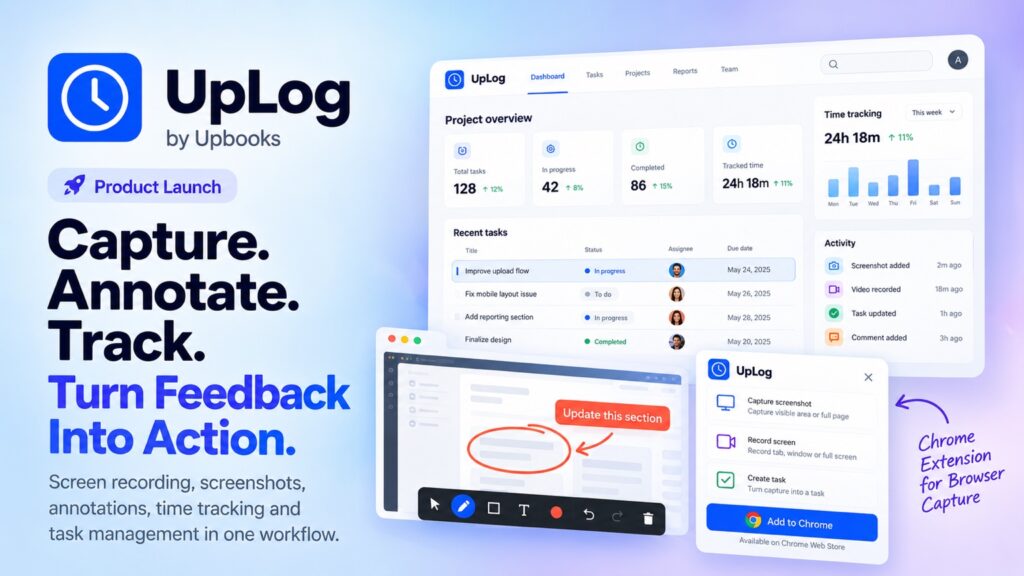
The new productivity tool connects visual feedback, automatic time tracking, work proof and project tasks in one workflow, with a Chrome extension built for faster capture-to-action collaboration.
BUSINESS & TECHNOLOGY | PRODUCT LAUNCH
As teams increasingly work across browsers, distributed projects and asynchronous workflows, UpLog is being introduced as a work-management and visual communication tool designed to connect screen capture with the action that follows. Built by Upbooks, UpLog combines screen recording, screenshot capture, annotation, automatic time tracking, task management and visual work proof in a single workflow. Upbooks is part of the wider software ecosystem developed by Scrrum Labs, positioning UpLog as a focused product within a broader business productivity suite.
UpLog is designed around a simple workflow: capture, explain, assign and track. Users can capture a screenshot or record a browser tab, window or full screen, then add arrows, highlights, boxes, text and freehand annotations. Video clips can be trimmed and marked up before being attached to tasks or shared with colleagues. The result is a visual record that can move directly into a work process instead of remaining as a standalone file or message.
A Chrome Extension Designed to Turn Feedback Into Action
One of UpLog’s most accessible entry points is its Chrome extension, which brings capture tools directly into the browser. Users can take screenshots, record screens, annotate captures and create tasks without repeatedly switching between applications. Captures can be shared through public or private links or converted into tasks with an assignee, description and due date. This workflow is aimed at QA and development teams, product and design teams, support teams and other businesses where visual feedback can be more efficient than lengthy written explanations.
The extension also supports the broader UpLog model in which a capture is not simply shared and forgotten. A bug report, design comment, customer issue or product walkthrough can move from visual proof to an actionable task, creating a clearer connection between what someone sees and what the team needs to do next.
More Than a Screen Recorder: Time Tracking and Work Proof
UpLog extends beyond screen recording with real-time time tracking, project and task organization, past-session history, screenshots and reporting. The platform supports one-click start/stop tracking, project and task selection and automatic time capture, reducing reliance on manual timesheets. Users can review total hours, sessions and activity status, while managers can view team-level information.
Its visual work-proof layer includes screenshot galleries, annotated captures, thumbnail previews and full-screen viewing. This can support client billing, project costing, performance reviews and dispute resolution by keeping visual evidence alongside recorded work sessions. UpLog also provides project and task views in both list and Kanban formats, with priorities, assignees, due dates, filters and workflow configuration.
For managers and administrators, UpLog includes an admin panel covering users, employees, projects, tasks and organization statistics. Reporting includes summary and detailed reports, weekly trends, charts, daily user activity, utilization, client billing and team velocity, with CSV export available for reporting workflows.
Video Reviews, Version Feedback and Annotation
Another part of the product positioning is its support for video reviews, comments and annotation across video versions. This expands the use case beyond one-time bug capture. Teams reviewing product demos, creative work, interfaces or development updates can use visual comments and annotations to make feedback more specific while retaining the context of the work being reviewed.
How UpLog Fits Inside the Scrrum Labs and Upbooks Ecosystem
The product hierarchy is important to understanding the launch. Scrrum Labs is the broader IT consultation and software development company behind the ecosystem. Upbooks is its AI-powered business productivity and management suite, while UpLog is one of the products within that suite, focused on visual work capture, time tracking and task execution. The Upbooks website describes the wider platform across areas including project management, accounting and finance, POS and sales, inventory, HR, CRM, customer portal and procurement.
This ecosystem approach means UpLog can be used as a dedicated workflow tool while also sitting alongside broader business functions. Upbooks’ current product ecosystem includes apps and modules such as LeadTrackr, Project Management, QuikBilling, Expense Tracker, Employee Connect, Notekeepr, Talent Flow and other business applications. The company is increasingly presenting these capabilities as connected components of a unified business operating environment rather than isolated tools.
One Plan. One Ecosystem.
Upbooks is being positioned around a simple value proposition:one plan gives users access to the broader Upbooks ecosystemof business applications, bringing tools such as UpLog, LeadTrackr, project management, finance, sales, HR, inventory and other operational capabilities into one connected environment. Instead of managing a collection of unrelated subscriptions, businesses can work within a unified platform.
The plan is designed to be accessible fromRs. 0 per monthto get started, with no cost and no credit card required. The emphasis is on giving businesses a low-friction way to enter the ecosystem and use the connected tools that fit their workflow.
Built for Teams That Need the Work Behind the Message
The central proposition behind UpLog is that workplace communication should lead to execution. A screenshot can show a problem, a recording can explain it, an annotation can identify the exact issue and a task can give the team a defined next step. By bringing these stages together with time tracking, work proof, project organization and reporting, UpLog is designed to reduce the gap between feedback and completion.
For remote and hybrid teams, agencies, product companies, software teams, QA groups, support operations and client-service businesses, this creates a workflow in which visual communication can be connected directly to accountability. The broader Upbooks ecosystem adds another layer by bringing work management into a larger environment covering finance, sales, HR, CRM, inventory and other operational functions.
Access UpLog
Users can explore UpLog and start with the web experience at uplog.one. The Chrome extension is available directly through the Chrome Web Store, giving teams a direct browser-based route to screenshots, screen recordings, annotations and task creation.
KEY PRODUCT HIGHLIGHTS
|
UpLog Capability |
What It Brings Together |
|
Screen & Screenshot Capture |
Tab, window or full-screen recording plus screenshot capture |
|
Annotation |
Pen, highlights, boxes, arrows, text and freehand markup |
|
Feedback-to-Task |
Turn captures into tasks with assignees, descriptions and due dates |
|
Time Tracking |
One-click tracking, automatic capture, sessions and project/task time |
|
Visual Work Proof |
Screenshot galleries, annotated evidence and session history |
|
Project & Task Management |
List and Kanban views, priorities, filters, workflows and due dates |
|
Reports & Admin |
Utilization, billing, activity, velocity, detailed reports and CSV export |
|
Chrome Extension |
Capture, annotate, share and create tasks directly from the browser |
EXPLORE UPLOG & UPBOOKS